

Discover the secret to effortlessly transferring your data from spreadsheet to SQL with our foolproof, streamlined migration process.

Table of Contents
Welcome, educators turned data analysts! If you’re making the transition from managing data in Excel to harnessing the power of SQL, you’re in the right place. In this blog post, we’ll guide you through the process of going from spreadsheets to seamless SQL, empowering you to effectively manipulate and analyze your data like never before.
Understanding the Differences between Excel and SQL
In the world of data management, Excel has long been a staple tool for organizing and analyzing information. However, as teachers taking on the role of data analysts, you may have already encountered Excel’s limitations when handling large datasets or complex queries. SQL, on the other hand, is a specialized language designed specifically for managing and querying structured data with efficiency and scalability.
When transitioning from Excel to SQL, it’s important to be aware of the distinct advantages that SQL offers. Unlike Excel, SQL allows for faster data processing, advanced querying capabilities, and the ability to handle vast quantities of data without compromising performance. By mastering SQL, you’ll be equipped with a powerful tool for unlocking valuable insights from your educational datasets.
Getting Started with SQL
If you’re new to SQL, fear not! Getting started with this powerful language is easier than you might think. SQL stands for Structured Query Language, and it serves as the foundation for interacting with relational databases. To begin your SQL journey, familiarize yourself with basic syntax, such as SELECT, INSERT, UPDATE, and DELETE commands.
There are plenty of online resources available to help you learn SQL, including interactive tutorials, courses, and practice exercises. Dive in, experiment with queries, and watch as your data analysis skills soar to new heights with SQL at your fingertips.
Importing Data from Excel to SQL
One of the first steps in transitioning from Excel to SQL is transferring your existing data from spreadsheets into SQL tables. Fortunately, migrating data from Excel to SQL is a straightforward process that can be accomplished with just a few simple steps.

Image courtesy of rajanieshkaushikk.com via Google Images
To import data from Excel to SQL, begin by saving your Excel spreadsheet as a CSV file. This file format is widely supported and makes it easy to import data into SQL databases. Next, use SQL’s built-in tools or third-party software to upload the CSV file and create a new table in your SQL database. With your data successfully imported, you’re now ready to start working with it in SQL.
Creating Tables in SQL
Once your data is securely stored in a SQL database, the next step is to create tables that will organize and structure your information for efficient querying. To create a table in SQL, you’ll need to define the table’s columns, data types, and any constraints that should be enforced to maintain data integrity.
When designing tables in SQL, consider the relationships between different entities in your dataset and how best to represent these connections through keys and indexes. By carefully crafting your SQL tables, you’ll establish a solid foundation for organizing and manipulating your educational data with precision and clarity.
Writing SQL Queries
With your data imported and tables created, it’s time to start writing SQL queries to extract valuable insights from your datasets. SQL queries allow you to retrieve specific data, filter results, and perform calculations to analyze trends and patterns within your educational data.

Image courtesy of www.projectpro.io via Google Images
To write a basic SQL SELECT query, begin by specifying the columns you want to retrieve and the table from which to retrieve them. You can further refine your query by adding conditions, sorting results, and using functions to aggregate data. As you gain proficiency in crafting SQL queries, you’ll unlock the full potential of your educational datasets and uncover meaningful insights to inform your decision-making.
Grouping and Filtering Data
Grouping and filtering data are essential techniques in SQL that allow you to organize and narrow down your dataset to focus on specific subsets of information. With SQL’s GROUP BY and HAVING clauses, you can group related data together and apply filters to isolate key trends or outliers within your educational data.
Experiment with grouping and filtering data in SQL to segment your datasets by different criteria, such as student grades, attendance records, or assessment scores. By mastering these techniques, you’ll be able to spot patterns, identify correlations, and derive actionable insights from your educational datasets with precision and clarity.
Joins and Relationships in SQL
In the realm of relational databases, establishing connections between different tables is crucial for querying and analyzing interconnected data. SQL offers a range of join operations that allow you to merge data from multiple tables based on common keys or relationships.

Image courtesy of www.projectpro.io via Google Images
Common types of joins in SQL include INNER JOIN, LEFT JOIN, and RIGHT JOIN, each serving a specific purpose in combining and retrieving data from related tables. By mastering joins and relationships in SQL, you’ll be able to integrate disparate datasets, conduct complex analyses, and draw meaningful conclusions from your educational data with ease.
Aggregating Data in SQL
Aggregating data in SQL involves performing computations on groups of data to derive summary statistics or insights. SQL provides a variety of aggregate functions, such as SUM, AVG, MAX, and COUNT, that allow you to calculate totals, averages, and other aggregate measures across your datasets.
Experiment with aggregating data in SQL to analyze trends, track performance metrics, and derive valuable insights from your educational datasets. By leveraging aggregate functions effectively, you’ll be able to summarize and interpret large volumes of data with efficiency and precision, helping to guide data-informed decision-making in your educational endeavors.
Advanced SQL Tips and Tricks
As you continue to expand your SQL skills and delve deeper into the world of data analysis, there are several advanced tips and tricks that can enhance your proficiency and efficiency in working with SQL.
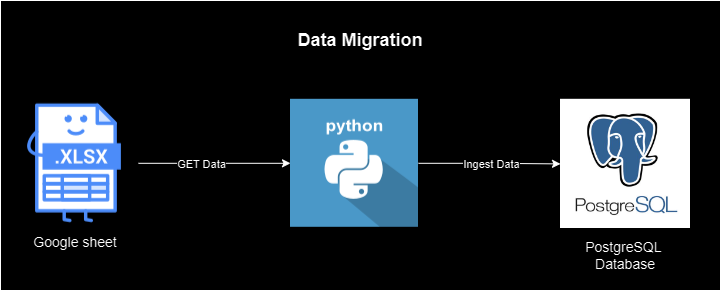
Image courtesy of medium.com via Google Images
Explore techniques for optimizing query performance, leveraging stored procedures and views, and implementing advanced SQL functions and features. By incorporating these advanced tips and tricks into your SQL repertoire, you’ll be well-equipped to tackle complex data analysis tasks, uncover hidden insights, and become a data analytics powerhouse in your educational environment.
Conclusion
Congratulations on making the leap from spreadsheets to SQL! By mastering SQL and transitioning from Excel to SQL, you’ve equipped yourself with a powerful arsenal of tools for data management and analysis. As educators turned data analysts, you have the unique opportunity to leverage SQL’s capabilities to extract valuable insights from educational data, drive informed decision-making, and enhance learning outcomes for your students.
Continue to explore and experiment with SQL, refine your querying skills, and apply advanced techniques to unlock the full potential of your educational datasets. With SQL by your side, the possibilities for data-driven decision-making are endless. Here’s to your continued success in your journey from spreadsheet to seamless SQL!
Generated by Texta.ai Blog Automation