

Discover the secret to seamless data management as we guide you through the transition from spreadsheets to SQL databases!

Table of Contents
So you’re a teacher looking to level up your data analysis game? Welcome aboard! As a teacher, you’re no stranger to data – grades, attendance records, test scores – it’s all there. But if you’ve been relying on good ol’ Excel for your data management needs, it’s time to take things up a notch and dive into the world of SQL. In this blog post, we’ll walk you through the exciting journey of transitioning from spreadsheets to databases, specifically focusing on SQL. Buckle up, because your data game is about to get a serious upgrade!
Understanding the Basics of SQL
Let’s start with the basics. SQL stands for Structured Query Language and it is a powerful tool for managing and analyzing data in databases. Think of it as a language that allows you to communicate with databases efficiently. In SQL, you use queries to retrieve, manipulate, and update data in a database. It’s like speaking the language of data! So, if you’re ready to embark on this SQL adventure, let’s dive a little deeper into the world of databases.
Setting up Your Database
Before you can start writing SQL queries, you need to set up a database. A database is like a digital filing cabinet where you can store and organize your data. One important concept in database design is normalization, which helps to eliminate redundancy and dependency in your data. So, think of it as tidying up your data house before you start working with it. Once you have your database set up and normalized, you’re ready to roll up your sleeves and get coding!
Writing Basic SQL Queries
Now, it’s time to get your hands dirty with some code! Writing a basic SQL query is like asking a question to your database and getting the answer you need. For example, you can use a SELECT statement to retrieve specific data from a table. The structure of an SQL query typically includes keywords like SELECT, FROM, WHERE, and ORDER BY. Don’t worry if it seems a bit intimidating at first – practice makes perfect!

Image courtesy of www.geeksforgeeks.org via Google Images
Using Functions and Operators in SQL
Functions and operators in SQL are like your Swiss army knife when it comes to data manipulation. Functions allow you to perform calculations, format data, and extract useful information from your database. Operators, on the other hand, help you compare values, perform arithmetic operations, and more. Common functions include AVG, COUNT, and SUM, while operators like =, <, >, and IN help you filter and sort your data with ease.
Joining Tables in SQL
In the world of databases, tables are your best friends when it comes to storing data. But what if you want to combine data from multiple tables to gain deeper insights? That’s where joining tables in SQL comes into play. By using JOIN statements, you can merge data from different tables based on a common key. There are different types of joins, such as INNER JOIN, LEFT JOIN, and RIGHT JOIN, each serving a specific purpose in combining data effectively. So, get ready to join the data party!
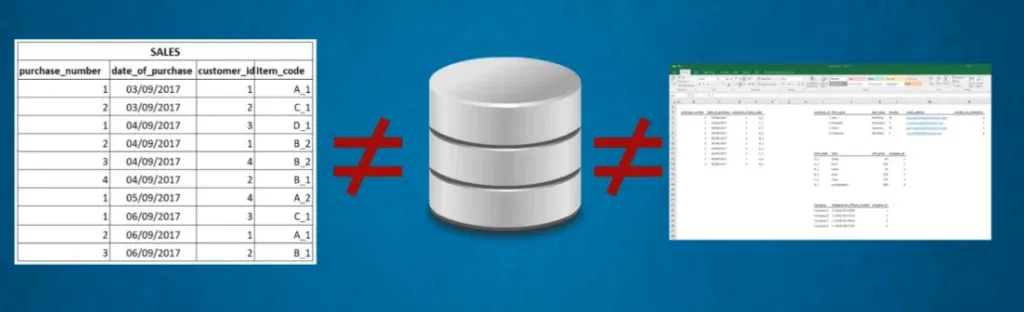
Image courtesy of 365datascience.com via Google Images
Filtering Data in SQL
Filtering data in SQL allows you to narrow down your results based on specific criteria. The WHERE clause in SQL enables you to set conditions for selecting data. For example, you can filter records where a certain value meets a specified condition. Whether you’re looking to find all students who scored above 90 in a test or filter out inactive accounts, the WHERE clause is your go-to tool for refining your data selection.
Grouping and Aggregating Data in SQL
Grouping and aggregating data in SQL are essential techniques for summarizing and analyzing large datasets. With the GROUP BY clause, you can group rows based on a specific column value, allowing you to perform aggregate functions like COUNT, SUM, AVG, and more. Aggregating data helps you gain valuable insights and create meaningful reports from your database. So, get ready to crunch those numbers and uncover hidden patterns in your data!

Image courtesy of www.geeksforgeeks.org via Google Images
Working with Subqueries in SQL
Subqueries in SQL are like mini-queries nested within a larger query. They allow you to break down complex problems into smaller, more manageable queries. Subqueries can be used for tasks like filtering data based on the results of another query, comparing results, and accessing data from multiple tables. By mastering subqueries, you can enhance the flexibility and power of your SQL queries, making your data analysis more efficient and dynamic.
Tips and Tricks for Efficient SQL Query Writing
Ready to take your SQL skills to the next level? Here are some pro tips and tricks to optimize your SQL query writing:
– Write clear and concise queries for better readability.
– Use indexes to improve query performance.
– Avoid using SELECT * and only retrieve the columns you need.
– Test your queries on sample data before running them on large datasets.
By adopting these best practices, you’ll be on your way to becoming a SQL query ninja in no time!
Image courtesy of www.quora.com via Google Images
Conclusion
Congratulations, you’ve made it to the end of our journey from spreadsheet to database! By transitioning from Excel to SQL, you’ve equipped yourself with the tools and knowledge to unlock the true potential of your data. As a teacher turned data analyst, you have the power to uncover valuable insights, make informed decisions, and take your data analysis skills to new heights. So, keep exploring, practicing, and challenging yourself in the world of SQL – your data-driven future awaits!
Generated by Texta.ai Blog Automation