

Unleash the power of SQL in transforming spreadsheets into efficient databases. Learn the secrets of data management in this guide!

Table of Contents
Greetings, teachers! Are you ready to take your data management skills to the next level? In this comprehensive guide, we will walk you through the essential tips for transitioning from Excel to SQL. By mastering the basics of SQL, you will be able to efficiently manage and analyze data in a way that Excel simply can’t match. Let’s dive in!
Understanding the Basics of SQL
SQL, or Structured Query Language, is a powerful tool used for managing and manipulating databases. In simple terms, SQL allows you to retrieve and manipulate data stored in a database. The key to unlocking the full potential of SQL lies in understanding its commands and syntax.
Common SQL commands include SELECT, INSERT, UPDATE, DELETE, and JOIN. These commands allow you to query data, add new records, update existing records, delete records, and perform operations involving multiple tables. Familiarizing yourself with these commands is crucial for effectively using SQL.
Setting Up Your SQL Environment
Before you can start working with SQL, you’ll need to set up your SQL environment. This involves installing a SQL database system on your computer or using an online platform. Popular SQL database systems include MySQL, PostgreSQL, and Microsoft SQL Server.
Once you have your SQL database system up and running, you’ll need to become familiar with the SQL interface. This interface allows you to interact with the database, execute SQL commands, and manage database objects such as tables, views, and stored procedures.
Importing Data from Excel to SQL
If you’re coming from an Excel background, you may already have data stored in Excel spreadsheets that you’d like to analyze using SQL. The good news is that it’s easy to import data from Excel to SQL.

Image courtesy of www.linkedin.com via Google Images
The first step is to export your Excel data as CSV (Comma-Separated Values) files. CSV files are a common format for storing tabular data that can be easily imported into SQL databases. Once you have your CSV files, you can import them into SQL database tables using SQL commands or a tool provided by your database system.
Creating and Managing SQL Tables
In SQL, data is organized into tables, which consist of rows and columns. To work with data effectively in SQL, you’ll need to understand how to create and manage SQL tables.
When creating a table in SQL, you’ll need to define the table structure, including the names and data types of the columns. For example, a table storing student information might have columns for student ID, name, and grade. It’s important to choose appropriate data types for each column to ensure data consistency and integrity.
Writing SQL Queries
One of the key tasks in SQL is writing queries to retrieve data from a database. The most basic SQL query is the SELECT statement, which allows you to retrieve data from one or more tables.
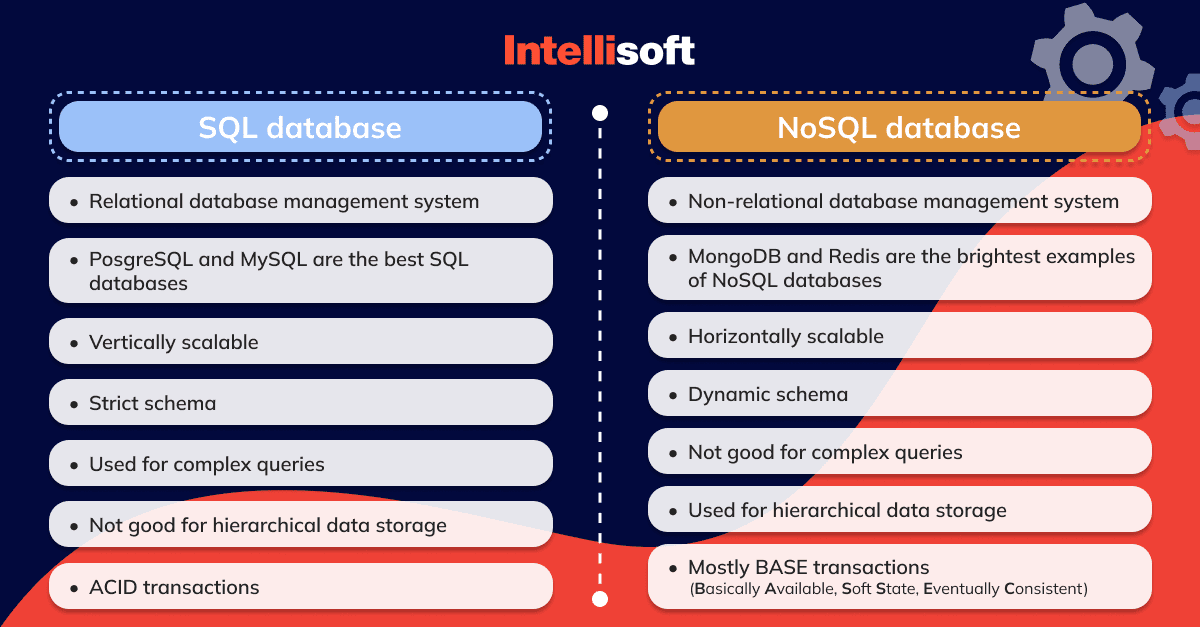
Image courtesy of intellisoft.io via Google Images
When writing a SELECT statement, you can specify the columns you want to retrieve, the table or tables from which to retrieve data, and any conditions for filtering the data. For example, you could write a SELECT statement to retrieve all students with a grade of A from a student table.
Understanding SQL Joins
SQL joins are used to combine data from multiple tables based on a related column between them. There are several types of SQL joins, including INNER JOIN, LEFT JOIN, RIGHT JOIN, and FULL JOIN.
For example, an INNER JOIN returns only rows that have matching values in both tables, while a LEFT JOIN returns all rows from the left table and the matched rows from the right table. Understanding how to use SQL joins is crucial for working with relational databases and querying data from multiple tables.
Data Manipulation with SQL
In addition to querying data, SQL allows you to manipulate data by inserting, updating, or deleting records in a database table. The INSERT statement is used to add new records, the UPDATE statement is used to modify existing records, and the DELETE statement is used to remove records.
Image courtesy of www.analytixlabs.co.in via Google Images
SQL also provides a range of functions for manipulating data, such as calculating totals, extracting substrings, and converting data between different formats. By mastering data manipulation with SQL, you can perform complex data operations and transformations.
Advanced SQL Techniques
Once you have a solid understanding of the basics of SQL, you can explore advanced techniques to enhance your data management and analysis skills. One such technique is using subqueries, which are nested queries that can be used to retrieve data based on the results of another query.
Another advanced feature of SQL is stored procedures, which are precompiled SQL statements stored in the database and executed when called. Stored procedures can help improve performance, simplify complex queries, and enhance database security by protecting against SQL injection attacks.
Best Practices for SQL Beginners
As you continue to learn and practice SQL, there are some best practices that can help you become more proficient in working with databases. One important practice is to document your SQL queries and code, including comments that explain the purpose of each query and any assumptions made.
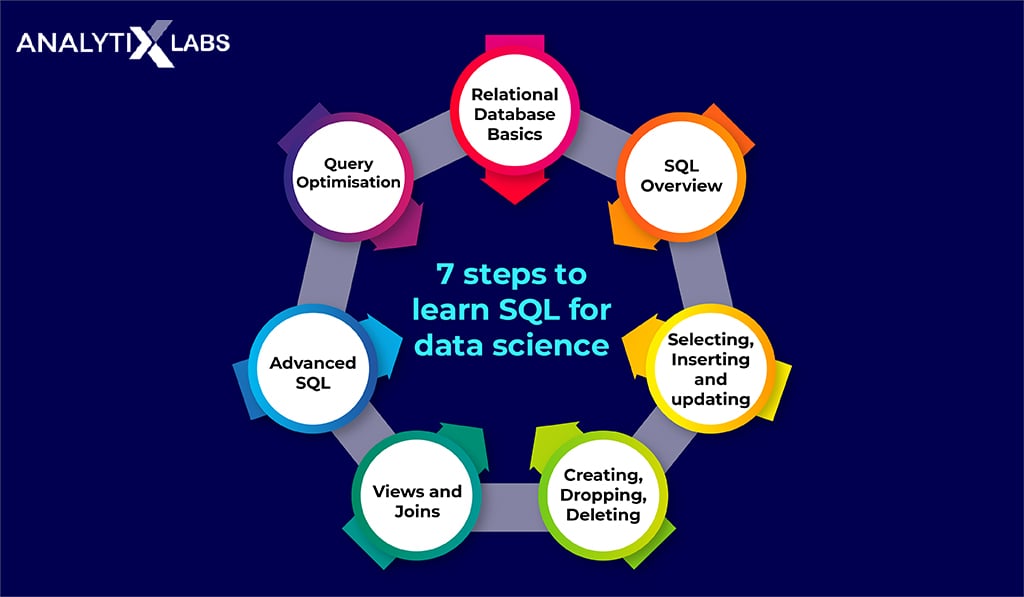
Image courtesy of www.analytixlabs.co.in via Google Images
It’s also helpful to seek out resources for further learning and improvement, such as online tutorials, books, and courses. By continuously honing your SQL skills and staying up to date with the latest developments in the field, you can become a proficient data analyst and unlock the full potential of SQL.
Conclusion
Congratulations, teachers, on taking the first steps toward mastering SQL for data management! By understanding the basics of SQL, setting up your SQL environment, importing data from Excel, creating and managing SQL tables, writing queries, and exploring advanced techniques, you can build a solid foundation for working with databases.
Remember to practice regularly, seek out new learning opportunities, and apply your SQL skills to real-world data analysis tasks. With dedication and persistence, you’ll be well on your way to becoming a skilled data analyst and unlocking the power of SQL. Happy querying!
Generated by Texta.ai Blog Automation