

Uncover the secrets of seamless data migration from Excel to SQL with this ultimate step-by-step guide. Propel your skills now!

Table of Contents
Are you a teacher looking to enhance your data analysis skills? Transitioning from Excel to SQL can be a game-changer in the way you manage and analyze large datasets. In this comprehensive guide, we will walk you through the essential tips and techniques to smoothly go from Excel to SQL. Let’s dive in!
Understanding SQL Basics
Before we delve into the world of SQL, let’s brush up on some basics. SQL, which stands for Structured Query Language, is a powerful programming language used for managing and manipulating data within relational databases. In SQL, data is stored in tables, and queries are used to retrieve and modify this data using commands such as SELECT, INSERT, UPDATE, and DELETE.
Differences Between Excel and SQL
While Excel is a handy tool for simple data analysis and visualization, it has limitations when dealing with large datasets and complex queries. SQL, on the other hand, excels in handling massive amounts of data efficiently and executing intricate queries seamlessly. By transitioning to SQL, you can unlock a whole new level of data analysis capabilities.
Setting up a SQL Environment
Getting started with SQL is easier than you think. Install SQL Server Management Studio (SSMS), a user-friendly tool that allows you to connect to databases, create and execute queries. Once you have SSMS up and running, you’re ready to take the next steps in your SQL journey.

Image courtesy of modlogix.com via Google Images
Importing Data from Excel to SQL
To migrate your data from Excel to SQL, begin by exporting your Excel data to a CSV file format. This ensures compatibility with SQL databases. Next, import the CSV file into SQL Server using the Import Data Wizard in SSMS. This smooth transfer of data sets the stage for seamless data analysis in SQL.
Writing SQL Queries
Now that you have your data in SQL, it’s time to start querying! Use the SELECT statement to retrieve data from tables, apply WHERE clauses to filter specific data, and master the art of joining tables using INNER JOIN for relational data analysis.

Image courtesy of www.projectpro.io via Google Images
Grouping and Aggregating Data
Grouping and aggregating data are essential techniques in SQL analysis. Utilize the GROUP BY clause along with aggregate functions such as SUM, COUNT, and AVG to group and summarize data effectively. The HAVING clause allows you to further filter and analyze grouped data sets.
Using Subqueries and Nested Queries
Subqueries and nested queries are handy tools for extracting complex data insights. Embed subqueries within SELECT, WHERE, and FROM statements to perform advanced data analysis tasks. Master the art of nesting queries to streamline your SQL analysis workflow.

Image courtesy of www.projectpro.io via Google Images
Creating and Modifying Tables
Creating and modifying tables are fundamental SQL skills. Learn to create new tables using the CREATE TABLE statement and make changes to existing table structures using the ALTER TABLE statement. These commands empower you to design data structures tailored to your analysis needs.
Best Practices for SQL Coding
Adopting best practices in SQL coding enhances the readability and efficiency of your queries. Use comments to document your code, maintain a well-organized coding style with proper indentation and formatting, and always test your queries before executing them in a production environment. These practices will set you up for success in your SQL journey.
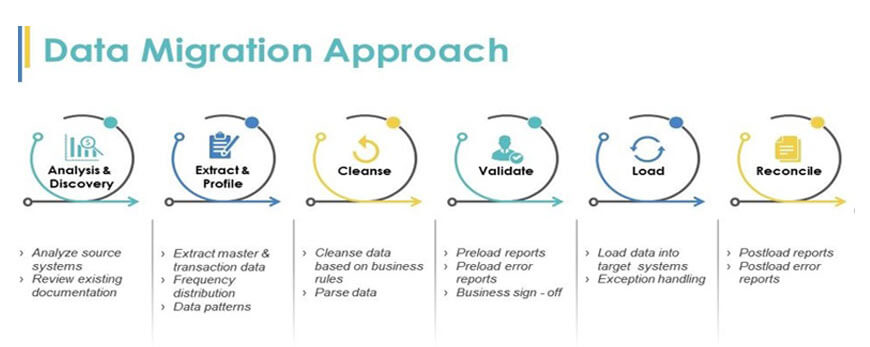
Image courtesy of www.applexus.com via Google Images
Conclusion
Congratulations on making the leap from Excel to SQL! By mastering the essential tips and techniques outlined in this guide, you’re well on your way to becoming a proficient data analyst. Keep practicing, exploring new SQL features, and applying your newfound skills to real-world data analysis tasks. Remember, the journey from Excel to SQL is not just a shift in tools but a transformation in how you approach data analysis. Embrace the power of SQL and unlock a world of possibilities in the realm of data analytics!
Ready to elevate your data analysis game? Dive into the world of SQL and unleash your analytical prowess. Happy querying!
Generated by Texta.ai Blog Automation