

Transforming raw data into visual insights with Tableau: Learn how to take your data engineering skills to the next level.

Table of Contents
Hey there, fellow teachers diving into the world of data analytics! Are you ready to unlock the power of data visualization with Tableau? In this blog post, we’ll walk you through the essential tips and tricks to help you maximize your success in using this powerful tool for your data analysis projects. Let’s get started!
Understanding the Basics
Before we jump into the exciting world of Tableau, let’s take a moment to understand some key concepts in data analytics. Data engineering involves the process of collecting, storing, and processing data to make it usable for analysis. Data lineage refers to the path that data takes from its source to its destination, while data ownership involves the responsibility for the management and security of data. All of these components play a crucial role in ensuring accurate and reliable data analysis.
Mastering SQL and Excel
SQL (Structured Query Language) is a powerful tool for database management and data analysis. By learning how to write SQL queries, you can extract valuable insights from your data with ease. Excel is another essential tool for data manipulation and visualization. From organizing data in spreadsheets to creating charts and graphs, Excel provides a user-friendly interface for analyzing data quickly and effectively.
Harnessing the Power of Python and R
Python and R are popular programming languages among data analysts for their versatility and robust data analysis libraries. Whether you’re a beginner or an experienced coder, mastering Python and R can open up a world of possibilities in your data analysis projects. From data cleaning and exploration to building machine learning models, these languages offer endless opportunities for data analysis.
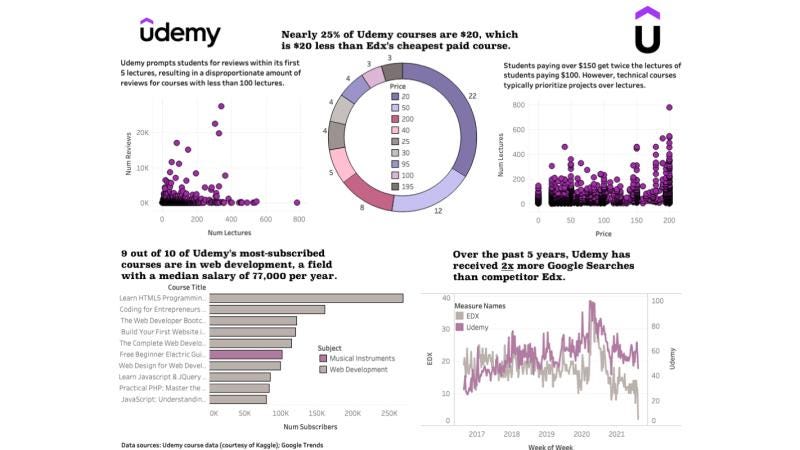
Image courtesy of medium.com via Google Images
Utilizing Tableau and PowerBI
Tableau and PowerBI are both powerful data visualization tools that allow you to create interactive and engaging visualizations of your data. With Tableau, you can drag and drop fields to build visualizations quickly and intuitively. PowerBI, on the other hand, offers seamless integration with other Microsoft products and advanced capabilities for data analysis. By mastering these tools, you can bring your data to life and communicate your findings effectively.
Ensuring Data Quality
Ensuring data quality is essential for accurate and reliable data analysis. By implementing data validation checks, cleaning and organizing your data, and documenting your data sources and transformations, you can maintain data integrity throughout your analysis process. Data governance practices, such as setting up data access controls and maintaining data lineage documentation, also play a crucial role in ensuring data quality.

Image courtesy of www.linkedin.com via Google Images
Maximizing Data Insights
Extracting valuable insights from data requires more than just technical skills – it also involves critical thinking and a keen understanding of the data. By leveraging advanced analytics techniques such as predictive modeling and clustering analysis, you can uncover hidden patterns and trends in your data. Storytelling with data is another important skill that helps you communicate your findings in a meaningful and compelling way.
Enhancing Collaboration
Collaboration is key to successful data analysis projects. By fostering open communication and collaboration between data analysts, data engineers, and other stakeholders, you can ensure that everyone is on the same page and working towards a common goal. Effective project management practices, such as setting clear objectives and milestones, can help streamline collaboration and keep your data analysis projects on track.

Image courtesy of www.intellectyx.com via Google Images
Continuous Learning and Development
The field of data analytics is always evolving, with new technologies and techniques emerging at a rapid pace. As a teacher becoming a data analyst, it’s important to stay up-to-date with the latest trends and tools in the industry. By participating in online courses, attending workshops and conferences, and engaging with the data analytics community, you can continue to hone your skills and stay ahead of the curve.
So there you have it – a beginner’s guide to Tableau and data analytics! By mastering the fundamentals of data engineering, data visualization, and data analysis, you can unlock the full potential of your data and drive meaningful insights for your teaching practice. Are you ready to take your data analysis skills to the next level? Let’s dive in and explore the exciting world of data analytics together!