

Unlock the secrets of data lineage with this comprehensive guide – follow the journey of your data from start to finish.

Table of Contents
- Establishing a Clear Understanding of Data Engineering
- The Importance of Data Lineage
- Practical Tips for Maintaining Accurate Data Lineage
- The Role of Data Ownership in Data Lineage
- Embracing SQL for Efficient Data Manipulation
- Leaning on Excel for Data Analysis and Visualization
- Exploring Data Analysis with Python
- Enhancing Statistical Analysis with R
- Visualizing Data with Tableau
- Empowering Business Intelligence with PowerBI
- Conclusion: Embarking on Your Data Analysis Journey
Welcome, aspiring data analysts who also happen to be teachers! Today, we’re going to dive into the fascinating world of data lineage and how it can make a world of difference in your data analysis journey. Staying organized, and understanding the flow and evolution of your data is essential to conducting accurate and meaningful analysis.
Establishing a Clear Understanding of Data Engineering
Before we delve into the intricacies of data lineage, let’s first grasp the basics of data engineering. Data engineering involves the processes and structures that bring raw data into a usable form for analysis. This step lays the foundation for all the analysis that follows, so ensuring clean, structured data is critical for accurate insights to be derived.
The Importance of Data Lineage
Data lineage refers to the complete journey of your data from its origin to its current state. Understanding data lineage is vital for tracking changes, identifying errors, and ensuring compliance with regulations.
Documenting data lineage can also help you understand the impact of any changes or updates to your datasets and maintain the integrity of your analyses over time. It’s like having a trail of breadcrumbs to follow whenever you need to retrace your steps.
Practical Tips for Maintaining Accurate Data Lineage
Now that we understand why data lineage is crucial, let’s delve into some practical tips for maintaining accurate data lineage:
.jpeg)
Image courtesy of www.castordoc.com via Google Images
1. **Documentation is Key:** Keep detailed records of the source of your data, data transformations, and any data quality checks. This documentation will serve as a guide for anyone looking to understand the history of the data.
2. **Automate Where Possible:** Utilize data lineage tools or features within your analytics platform to automatically track the flow of your data. Automation can save time and reduce the chances of manual errors.
3. **Regularly Update Your Data Lineage Documentation:** As your data evolves and changes, make sure to update your data lineage documentation to reflect these modifications. Keeping your records current will ensure accuracy and reliability in your analyses.
4. **Collaborate with Data Stakeholders:** Involve all relevant stakeholders in the data lineage process. By working together, you can ensure that everyone understands and contributes to the accuracy of data lineage documentation.
The Role of Data Ownership in Data Lineage
Another crucial aspect of data lineage is establishing clear data ownership. Data ownership defines who is responsible for the quality, accuracy, and security of the data. When data ownership is well-defined, it becomes easier to trace data lineage and ensure accountability.
Teachers embarking on the journey of data analysis should take the time to establish transparent data ownership within their educational institutions. This clarity can prevent misunderstandings and streamline the data lineage process.
Embracing SQL for Efficient Data Manipulation
Structured Query Language (SQL) is a powerful tool for querying databases and manipulating data. As a teacher transitioning into a data analyst role, mastering SQL can significantly enhance your data analysis capabilities.
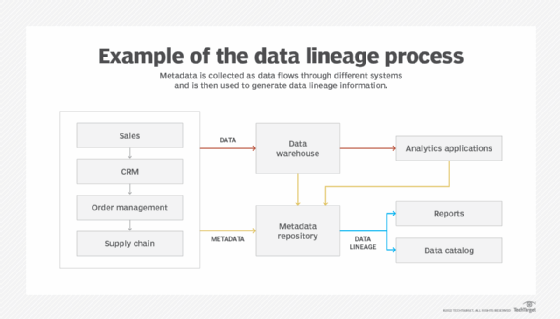
Image courtesy of www.techtarget.com via Google Images
Here are a few tips to help you make the most of SQL for efficient data manipulation:
1. **Practice Regularly:** Like any language, mastering SQL requires practice. Set aside time to work on SQL queries and practice manipulating different datasets.
2. **Utilize Online Resources:** There are plenty of online SQL tutorials and exercises available to help you enhance your skills. Take advantage of these resources to deepen your understanding of SQL concepts.
3. **Join SQL Communities:** Join online SQL communities or forums where you can ask questions, seek advice, and collaborate with other SQL enthusiasts. Learning from others can provide valuable insights and tips for improving your SQL proficiency.
Leaning on Excel for Data Analysis and Visualization
Excel is a versatile tool that many teachers are already familiar with, making it an excellent starting point for data analysis and visualization. Understanding how to leverage Excel’s functions and features can greatly enhance your data analysis capabilities.
Here are some tips for optimizing Excel for data analysis:
1. **Master Pivot Tables:** Pivot tables can help you summarize and analyze large datasets quickly and effectively. Learn how to create and customize pivot tables to gain deeper insights into your data.
2. **Utilize Formulas:** Excel’s formulas can automate calculations, data cleaning, and other repetitive tasks. Familiarize yourself with essential formulas like VLOOKUP, IF statements, and SUMIFS to streamline your data analysis process.
3. **Create Visualizations:** Excel offers various charting options that allow you to visualize data in a clear and compelling way. Experiment with different chart types to present your data effectively and make insights easily accessible.
Exploring Data Analysis with Python
Python is a versatile programming language that offers robust libraries and tools for data analysis. As a teacher looking to enhance your data analysis skills, learning Python can open up a world of possibilities for in-depth analysis and modeling.

Image courtesy of www.geeksforgeeks.org via Google Images
Here are some tips for harnessing Python for data analysis:
1. **Master Pandas Library:** Pandas is a powerful Python library for data manipulation and analysis. Familiarize yourself with Pandas’ functions and capabilities to efficiently work with structured datasets.
2. **Explore Data Visualization:** Python libraries like Matplotlib and Seaborn offer powerful visualization tools to create insightful charts and graphs. Experiment with these libraries to present your data in a visually engaging way.
3. **Take Online Courses:** There are numerous online courses and tutorials available for learning Python for data analysis. Enroll in these courses to deepen your Python skills and gain practical experience in data analysis.
Enhancing Statistical Analysis with R
R is a popular programming language for statistical analysis and data visualization. Teachers transitioning into data analyst roles can benefit from R’s extensive libraries and robust statistical capabilities.
Here are some tips for leveraging R for statistical analysis:
1. **Utilize Tidyverse Package:** Tidyverse is a collection of R packages that streamline data manipulation and visualization tasks. Explore Tidyverse’s functions and tools to enhance your data cleaning and analysis processes.
2. **Understand Statistical Modeling:** R offers powerful tools for statistical modeling and hypothesis testing. Familiarize yourself with R’s statistical functions to conduct in-depth analyses and derive meaningful insights from your data.
3. **Join R User Groups:** Participating in R user groups or online communities can provide valuable insights and support for mastering R. Engaging with fellow R users can help you troubleshoot issues, share best practices, and stay updated on the latest developments in the R ecosystem.
Visualizing Data with Tableau
Tableau is a leading data visualization tool that allows users to create interactive and engaging dashboards. As a teacher turned data analyst, mastering Tableau can help you present data in a clear and compelling manner.
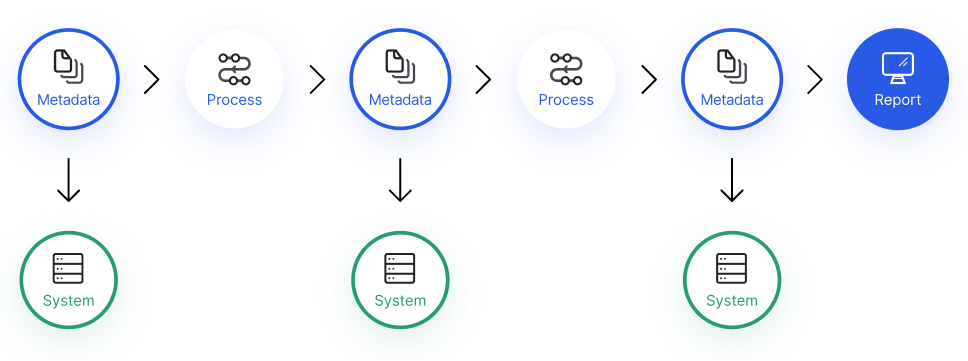
Image courtesy of www.imperva.com via Google Images
Here are some tips for visualizing data with Tableau:
1. **Design User-Friendly Dashboards:** Create intuitive and user-friendly dashboards that enable stakeholders to interact with data easily. Consider the end-user perspective when designing your Tableau visualizations.
2. **Utilize Interactivity:** Tableau offers various interactive features that enhance data exploration and engagement. Experiment with filters, parameters, and actions to add interactivity to your visualizations.
3. **Continuous Learning:** Tableau offers extensive training resources, tutorials, and webinars to help users improve their visualization skills. Take advantage of these resources to stay updated on Tableau’s features and functionalities.
Empowering Business Intelligence with PowerBI
PowerBI is a robust business intelligence tool that enables users to create insightful reports and dashboards for decision-making. As a teacher transitioning into a data analyst role, mastering PowerBI can enhance your ability to derive actionable insights from data.
Here are some tips for utilizing PowerBI for business intelligence:
1. **Connect Multiple Data Sources:** PowerBI allows you to connect to various data sources to create comprehensive reports. Explore PowerBI’s data connectivity options to bring all your data together in one place.
2. **Utilize DAX Formulas:** DAX (Data Analysis Expressions) formulas in PowerBI enable you to perform complex calculations and metrics. Familiarize yourself with DAX functions to customize your reports and derive meaningful insights.
3. **Collaborate and Share Insights:** PowerBI offers collaboration features that allow you to share reports and insights with colleagues and stakeholders. Use these features to promote data-driven decision-making and foster a culture of transparency within your organization.
Conclusion: Embarking on Your Data Analysis Journey
Congratulations, teachers turned data analysts, on taking the first steps towards mastering data lineage and leveraging powerful analytics tools. By understanding the basics of data engineering, establishing clear data lineage, and sharpening your skills in SQL, Excel, Python, R, Tableau, and PowerBI, you’re well on your way to becoming proficient in data analysis.
Remember, practice makes perfect, and continuous learning is key to enhancing your data analysis capabilities. As you embark on your data analysis journey, keep exploring new tools, techniques, and resources to broaden your knowledge and expertise in the field of data analytics. Your journey to becoming a data analyst is an exciting and rewarding one, filled with endless opportunities to uncover insights and make a meaningful impact through data-driven decision-making.
Happy analyzing!