

Discover the hidden secrets of data engineering and revolutionize your analytics workflow with these expert tips and tricks today.

Table of Contents
Hey there, teachers-turned-data analysts! Are you ready to dive into the world of data engineering and master the tools that can optimize your analytics workflow? In this blog post, we’ll explore some valuable tips and tricks for mastering essential data analytics tools like SQL, Excel, Python, R, Tableau, and PowerBI. Let’s get started!
Data Analytics Tools Overview
Before we jump into the specific tools, let’s quickly review the essential role that data analytics tools play in the field of data engineering and analysis. These tools are the backbone of your analytics workflow, enabling you to gather, process, analyze, and visualize data effectively. By becoming proficient in tools like SQL, Excel, Python, R, Tableau, and PowerBI, you’ll be equipped to tackle complex data analysis projects with ease.
Data Engineering Tips
When it comes to data engineering, optimizing data pipelines and ETL processes is crucial for efficiency and accuracy in your analytics workflow. To streamline your processes, consider setting up automated data pipelines, implementing data validation checks, and keeping your data models well-organized. By investing time in data engineering best practices, you’ll save yourself headaches down the line.
Data Lineage and Ownership
Understanding data lineage and ownership is key to maintaining the integrity and reliability of your analytics projects. By documenting the flow of data from source to destination and clarifying data ownership within your organization, you can prevent data discrepancies and ensure accountability for data quality. Implement tools and processes for tracking data lineage effectively to keep your analytics workflow running smoothly.
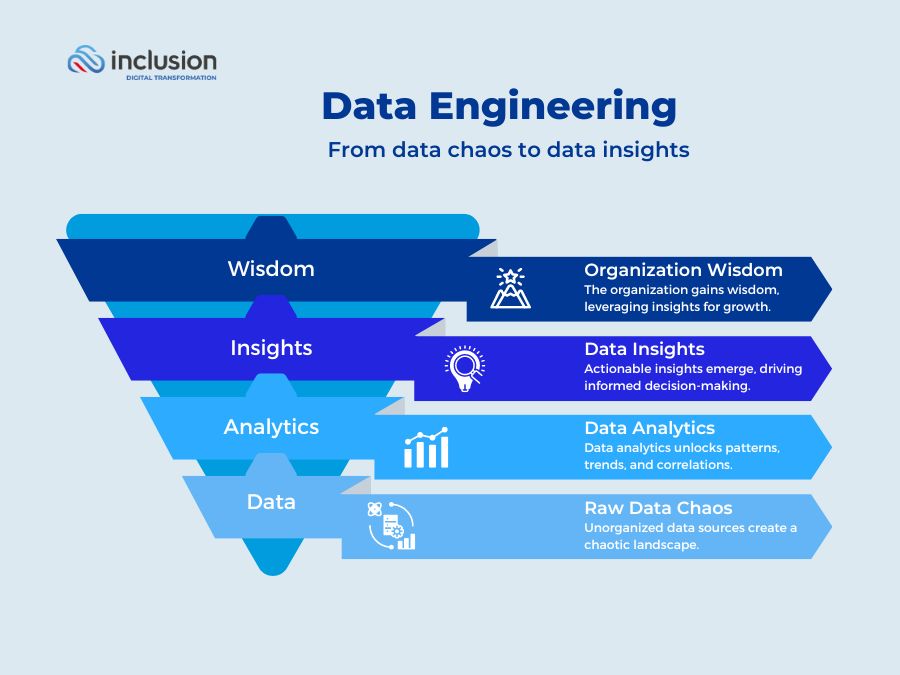
Image courtesy of inclusioncloud.com via Google Images
SQL Mastery
SQL is a foundational tool for data analysis, allowing you to query databases, manipulate data, and perform advanced analytics tasks. To master SQL, start by learning essential commands and functions like SELECT, WHERE, GROUP BY, and JOIN. As you progress, focus on optimizing your SQL queries for performance by indexing key columns, avoiding unnecessary joins, and using appropriate data types.
Excel Techniques
Excel is a versatile tool for data analysis and visualization, offering powerful features for working with spreadsheets and datasets. To make the most of Excel, familiarize yourself with key functions like VLOOKUP, SUMIF, and PivotTables. Organize your data effectively, use conditional formatting to highlight important insights, and leverage Excel’s charting tools for impactful data visualization.

Image courtesy of www.linkedin.com via Google Images
Python and R Programming
Python and R are popular programming languages for data analysis, offering robust libraries and tools for data manipulation and visualization. If you’re new to programming, start by exploring basic data structures, loops, and functions in Python and R. Dive into data cleaning, manipulation, and visualization tasks using libraries like pandas and ggplot2 to elevate your data analysis skills.
Tableau Visualization
Tableau is a powerful data visualization tool that allows you to create interactive dashboards and reports with ease. When working with Tableau, focus on understanding key features like drag-and-drop functionality, calculated fields, and parameters. Design visually appealing dashboards that tell a compelling story with your data, and explore best practices for creating effective data visualizations in Tableau.
Image courtesy of www.slideserve.com via Google Images
PowerBI Reporting
PowerBI is a robust reporting tool that enables you to design interactive reports and share insights across your organization. To master PowerBI, familiarize yourself with its reporting capabilities, including data modeling, DAX calculations, and sharing options. Create compelling reports that highlight key metrics and trends, and collaborate with team members to drive data-driven decision-making using PowerBI.
Conclusion
As you continue your journey into the world of data analytics, remember that mastering essential tools like SQL, Excel, Python, R, Tableau, and PowerBI is key to optimizing your analytics workflow. By following the tips and tricks outlined in this blog post, you’ll be well-equipped to tackle data analysis projects with confidence and efficiency. Keep learning, exploring, and practicing with these tools, and unlock the power of data engineering in your analytics journey!