

Uncover the secrets to seamless data migration from Excel to SQL with these expert tips and tricks. Say goodbye to spreadsheets!

Table of Contents
As a teacher delving into the world of data analysis, transitioning from Excel to SQL can seem like a daunting task. However, with the right tips and guidance, you can smoothly navigate this shift and unlock the powerful capabilities of SQL for your data analysis needs. In this blog post, we will explore essential strategies and best practices for successfully transitioning your data from Excel to SQL. Let’s dive in!
Understanding SQL Basics
SQL, or Structured Query Language, is a powerful programming language used for managing and manipulating data stored in databases. One of the key differences between Excel and SQL is that SQL is designed for querying and manipulating large datasets efficiently. Understanding the basics of SQL language is crucial for transitioning from Excel to SQL.
When working with SQL, you will write queries to retrieve, update, or delete data from a database. The syntax of SQL queries may seem daunting at first, but with practice and patience, you will become more comfortable writing and executing SQL commands.
Setting Up SQL Environment
Before you can start working with SQL, you will need to set up an environment to run SQL queries. There are several SQL platforms to choose from, such as MySQL, PostgreSQL, or SQL Server. Depending on your specific needs and preferences, you can select a SQL platform that best suits your requirements.
Installing and setting up SQL software is a relatively straightforward process. Most SQL platforms come with user-friendly installation guides that will walk you through the steps to set up the software on your computer. Once the software is installed, you can connect to databases and start querying data using SQL commands.
Importing Data from Excel to SQL
One of the first steps in transitioning from Excel to SQL is importing your data from Excel spreadsheets into a SQL database. To do this, you will need to export your data from Excel in a compatible format, such as CSV or Excel Workbook format. Once you have exported your data, you can import it into a SQL database using tools provided by your chosen SQL platform.
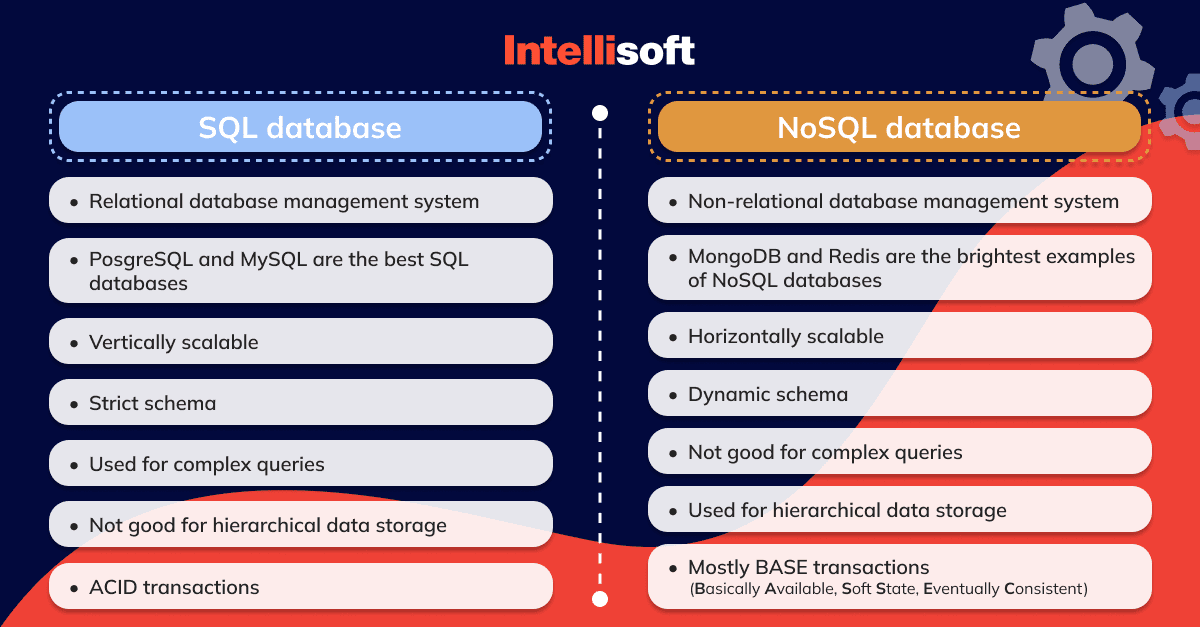
Image courtesy of intellisoft.io via Google Images
When importing data from Excel to SQL, it’s essential to pay attention to data types and formats. SQL databases have different data types than Excel, so you may need to adjust the formatting of your data to ensure a smooth transition. By properly handling data types and formats, you can avoid issues and errors when importing data into SQL.
Writing and Executing SQL Queries
After importing your data into a SQL database, you can start writing and executing SQL queries to retrieve and manipulate your data. SQL queries consist of various commands that allow you to filter, sort, and aggregate data in the database. Understanding the syntax of SQL queries is key to effectively querying databases and extracting the information you need.
When writing SQL queries, you can use commands such as SELECT, FROM, WHERE, ORDER BY, and GROUP BY to retrieve specific data from tables in the database. By mastering these basic SQL commands and understanding how to structure queries, you can efficiently retrieve and analyze data for your data analysis tasks.
Using Functions and Aggregations in SQL
In addition to basic queries, SQL provides a range of functions and aggregations that allow you to perform calculations and manipulate data in databases. Functions such as AVG, SUM, COUNT, and MAX can be used to calculate averages, sums, counts, and maximum values of data in columns.

Image courtesy of www.slidegeeks.com via Google Images
When using functions and aggregations in SQL, you can apply filters using the WHERE clause and group data using the GROUP BY clause to organize and analyze data effectively. By incorporating functions and aggregations into your SQL queries, you can derive valuable insights from your data and make informed decisions based on calculated metrics.
Joining Tables in SQL
One of the powerful capabilities of SQL is the ability to join tables from different datasets to perform more complex queries and analysis. SQL supports different types of joins, such as INNER JOIN, LEFT JOIN, and RIGHT JOIN, that allow you to combine data from multiple tables based on common columns.
When joining tables in SQL, you can write join queries that specify the columns to join on and the type of join to perform. By understanding how to join tables in SQL, you can unify data from disparate sources and perform comprehensive analysis that spans multiple datasets.
Implementing Subqueries in SQL
Subqueries are queries nested within other queries that allow you to retrieve data based on the results of another query. Subqueries are a powerful feature of SQL that enable you to perform more complex and dynamic data analysis tasks.
Image courtesy of www.quora.com via Google Images
When implementing subqueries in SQL, you can write queries that reference the results of subqueries to filter, sort, or aggregate data based on specific criteria. By mastering the use of subqueries, you can enhance the functionality of your SQL queries and extract more precise insights from your data.
Data Visualization with SQL
While SQL is primarily a querying language for databases, it can also be used for basic data visualization tasks. SQL queries can be used to extract and summarize data that can then be exported for use in data visualization tools or incorporated into dashboards for easy viewing.
By leveraging SQL for data visualization, you can create custom reports and visualizations that showcase key insights from your data. Exporting data from SQL for visualization or integrating SQL data into dashboard tools can enhance your ability to communicate findings and trends effectively.
Best Practices for SQL Efficiency and Performance
To optimize your use of SQL for data analysis, it’s important to follow best practices for efficiency and performance. Indexing tables for faster queries, optimizing SQL queries for speed, and monitoring and troubleshooting performance issues are essential components of using SQL effectively.
By implementing best practices for SQL efficiency and performance, you can streamline your data analysis processes, reduce query execution times, and ensure that your SQL queries run smoothly and efficiently. Continuously refining your SQL skills and adopting best practices will help you become a proficient data analyst using SQL.
Generated by Texta.ai Blog Automation