

Unleash the power of data management: Learn how to smoothly transition from spreadsheets to databases with expert SQL tips!

Table of Contents
Welcome, dear teachers! In today’s data-driven world, the ability to analyze and manage data efficiently is becoming increasingly important. As you transition from using spreadsheets like Excel to diving into the world of databases and SQL, you’re unlocking a whole new realm of possibilities for your data analysis skills. This blog post will guide you through the process step by step and help you become a proficient SQL user.
Understanding the Basics of SQL
Let’s start with the fundamentals. SQL, or Structured Query Language, is a powerful tool used for managing and analyzing data stored in relational databases. It uses simple yet powerful syntax to interact with databases, making it easier for you to retrieve and manipulate data. SQL consists of various commands and functions that allow you to perform a wide range of operations.
Setting Up Your Environment
Before you can start working with SQL, you need to set up your environment. The most popular option for SQL development is SQL Server Management Studio (SSMS). You can download SSMS for free from the Microsoft website and easily install it on your computer. Once installed, you can connect to databases and servers to start working with SQL.
Importing Data from Excel to SQL
One of the first steps in transitioning from Excel to SQL is transferring your data from spreadsheets to databases. While Excel is great for small datasets, SQL can handle much larger volumes of data and offers better performance for data analysis. You can import your Excel data into SQL using the SQL Server Import and Export Wizard, which guides you through the process seamlessly.
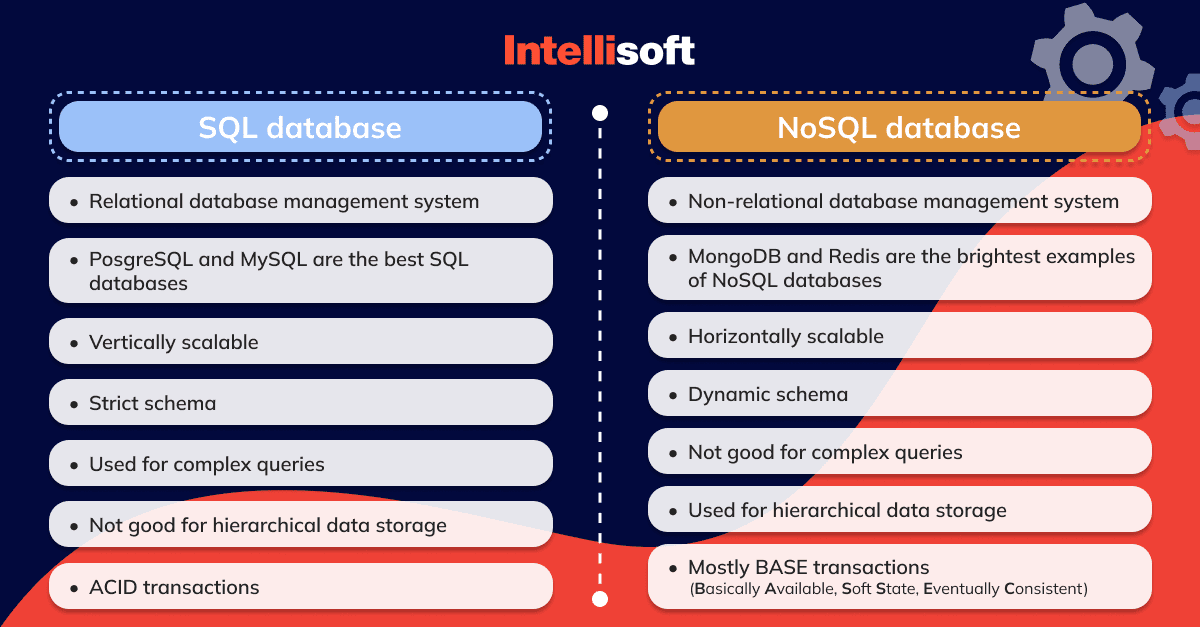
Image courtesy of intellisoft.io via Google Images
Executing SQL Queries
Once your data is in SQL, you can start writing and executing SQL queries to retrieve and manipulate data. SQL queries allow you to filter, sort, and analyze data in various ways. By learning basic SQL commands and functions, you’ll be able to extract meaningful insights from your data and make informed decisions based on the results.
Joining Tables in SQL
When working with relational databases, you often need to combine data from multiple tables to get a comprehensive view of your data. This is where joins come into play. SQL offers various types of joins such as INNER JOIN, LEFT JOIN, and RIGHT JOIN, allowing you to merge data from different tables based on common keys. Understanding how to join tables in SQL is essential for conducting complex data analysis.

Image courtesy of online.maryville.edu via Google Images
Data Visualization in SQL
Visualizing data is crucial for presenting insights and trends in a clear and meaningful way. SQL offers native tools that allow you to create charts, graphs, and reports directly within the database. By mastering data visualization in SQL, you can effectively communicate your findings and engage others with the data you’ve analyzed.
Advanced SQL Techniques
As you progress in your SQL journey, you’ll encounter more complex scenarios that require advanced techniques. Subqueries, nested queries, and SQL functions enable you to perform intricate data analysis and calculations. By exploring these advanced features of SQL, you can elevate your data analysis skills to a whole new level.

Image courtesy of www.linkedin.com via Google Images
Optimizing SQL Performance
To ensure your SQL queries run efficiently, it’s important to optimize their performance. Indexing is a powerful tool in SQL that helps speed up data retrieval by creating indexes on columns. Additionally, following best practices and optimizing your queries can improve database performance and enhance your overall SQL experience.
Conclusion
Congratulations on mastering the transition from spreadsheets to databases with SQL! By understanding the fundamentals of SQL, setting up your environment, and learning key techniques such as data import, query execution, table joins, and advanced features, you’ve equipped yourself with valuable data analysis skills that will benefit your teaching practices.
Remember, practice makes perfect when it comes to SQL. Continuous learning and exploring new SQL features will help you become a proficient data analyst and unlock the full potential of your data. Stay curious, stay creative, and keep diving deeper into the world of SQL. You’ve got this!