

Uncover the secret to seamless transition from spreadsheets to SQL with these game-changing Excel tips. SQL success awaits!

Table of Contents
Welcome, teachers who are eager to step into the world of data analysis! In today’s data-driven world, understanding how to efficiently analyze and manipulate data is a valuable skill. If you’ve been using Excel for your data analysis needs and are curious about levelling up to SQL, you’re in the right place. In this blog post, we will guide you through the process of transitioning from spreadsheets to Structured Query Language (SQL), providing you with essential tips to make this journey seamless.
Understanding the basics
As you begin your SQL journey, it’s essential to grasp the fundamental differences between Excel and SQL. While Excel is a powerful tool for data manipulation, SQL is a language specifically designed for database querying and management. One key distinction is that Excel operates in a row-and-column format, whereas SQL deals with sets of data stored in tables. To get started with SQL, acquaint yourself with basic syntax and commands such as SELECT, FROM, WHERE, ORDER BY, and GROUP BY.
Importing data from Excel to SQL
Transitioning your data from Excel to SQL is a crucial step in becoming proficient with SQL analysis. To effortlessly import your Excel data into SQL databases, begin by ensuring your data is properly formatted for optimal import. Structuring your Excel data in a tabular format and adhering to data type consistency will facilitate a smooth data transfer. Utilize SQL import functionalities to successfully transfer your Excel data into SQL tables, preserving the integrity of your records.
Manipulating data in SQL
Once your data is in SQL databases, you can wield the power of SQL for data manipulation. Harness the capabilities of SQL to sort and filter data efficiently, allowing you to retrieve targeted information based on specific criteria. Familiarize yourself with SQL functions for data manipulation, including mathematical operations, string manipulations, and date calculations. These functions will empower you to transform and analyze your data effectively within the SQL environment.

Image courtesy of www.linkedin.com via Google Images
Joining tables in SQL
Enhance your data analysis prowess by mastering the art of table joins in SQL. Understanding different types of joins, such as INNER JOIN, LEFT JOIN, and RIGHT JOIN, will equip you to merge data from multiple tables based on shared fields. By combining tables through SQL joins, you can consolidate insights from various datasets, enabling comprehensive data analysis and interpretation.
Aggregating data in SQL
Aggregate functions in SQL are indispensable tools for summarizing and analyzing data sets. Learn to use functions like SUM, AVG, COUNT, MIN, and MAX to extract valuable insights from your data. Grouping data with SQL aggregate functions allows you to categorize information and derive actionable conclusions, facilitating informed decision-making based on consolidated data summaries.

Image courtesy of www.linkedin.com via Google Images
Writing complex queries in SQL
Dive deeper into the realm of SQL analysis by crafting intricate queries that address specific data scenarios. Develop the skill of writing complex SQL queries using subqueries and nested queries to perform advanced analyses. Refine your query-writing technique to achieve concise and efficient SQL statements that yield precise results, streamlining your data analysis tasks.
Creating and managing databases in SQL
Establish a solid foundation in SQL database management by mastering the creation and management of databases and tables. Learn to create databases in SQL, define table structures, and manage relationships between tables using constraints like primary keys and foreign keys. By honing your skills in database management, you can organize and manipulate data effectively within the SQL environment.
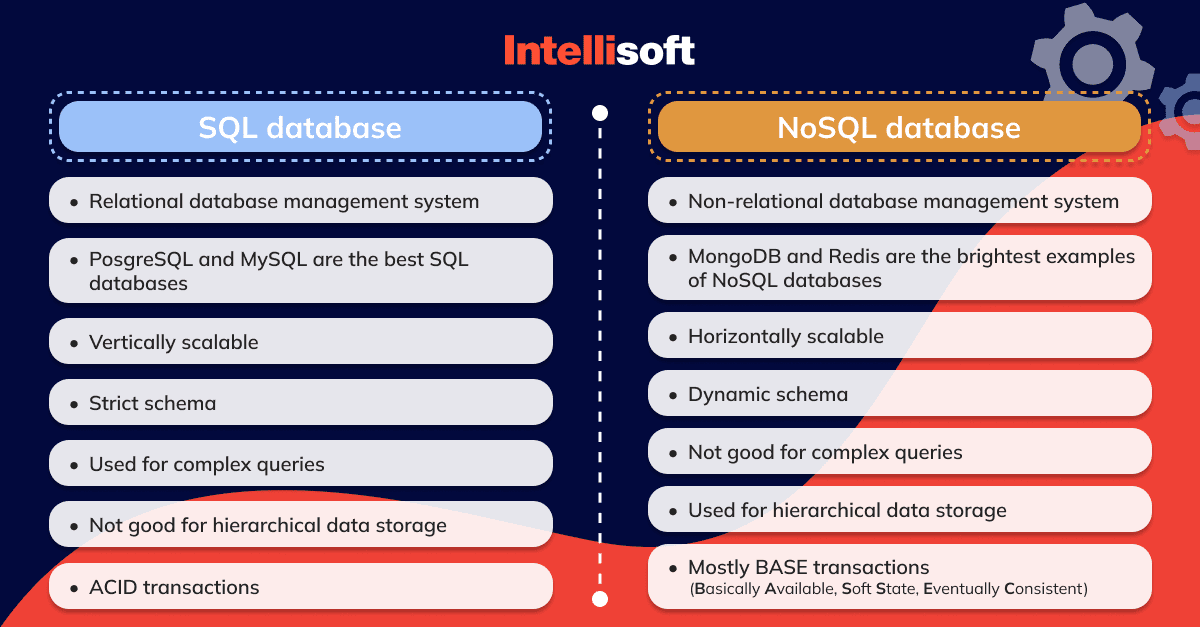
Image courtesy of intellisoft.io via Google Images
Working with dates and timestamps in SQL
Dates and timestamps play a crucial role in data analysis, and SQL offers functionalities for handling temporal data effectively. Familiarize yourself with formatting dates and timestamps in SQL, and leverage date-based calculations and operations to extract time-based insights from your datasets. With proficiency in working with dates and timestamps in SQL, you can conduct accurate and time-sensitive analyses for informed decision-making.
Advanced tips and resources for mastering SQL
For teachers aspiring to excel in SQL analysis, continuous learning and exploration are essential. Delve into advanced SQL concepts by exploring recommended resources, such as online tutorials, courses, and forums dedicated to SQL mastery. Implement tips for optimizing SQL queries, enhancing query performance, and leveraging advanced SQL functionalities to elevate your data analysis expertise.

Image courtesy of www.crmsoftwareblog.com via Google Images
Conclusion
Congratulations on taking the initiative to transition from Excel to SQL for your data analysis endeavors. By mastering SQL fundamentals, importing data seamlessly, manipulating data efficiently, and harnessing advanced SQL techniques, you are well on your way to becoming a proficient data analyst. Remember to practice regularly, explore new SQL functionalities, and continue learning to expand your SQL skills and enhance your data analysis capabilities. Embrace the power of SQL and embark on a rewarding journey towards analytical excellence!