

Unlock the power of SQL and leave your Excel days behind. Learn how to level up your data game today!

Table of Contents
Welcome, teachers on the road to becoming data analysts! Today, we’re diving into the world of SQL, a powerful tool that will revolutionize the way you manage and analyze data. Transitioning from Excel to SQL may seem daunting, but fear not – we’ve got you covered with essential tips to help you navigate this transition smoothly and confidently. Let’s embark on this exciting journey together!
Understanding the Basics of SQL
If you’re familiar with Excel, you may be wondering: what exactly is SQL and how does it differ? Well, SQL (Structured Query Language) is a language used for managing and analyzing databases. While Excel is great for small-scale data analysis, SQL shines when it comes to handling large datasets efficiently. In SQL, data is stored in tables, and you can use queries to interact with and extract information from these tables. It’s like Excel on steroids, with powerful capabilities to take your data analysis to the next level!
Setting Up Your SQL Environment
Now that you’re intrigued by the potential of SQL, it’s time to set up your SQL environment. Choosing the right SQL platform is crucial for a smooth transition. You have options like MySQL, SQL Server, and PostgreSQL – each with its own strengths and features. Once you’ve selected your platform, installing and configuring SQL on your computer is a breeze. Just follow the installation instructions provided by the platform, and you’ll be up and running in no time!
Importing Data from Excel to SQL
One of the first steps in your SQL journey is to import data from Excel into your SQL database. This process may seem tricky at first, but we’ve got you covered. Start by exporting your data from Excel into a compatible format, such as a CSV file. Then, use your SQL platform’s import tools to bring the data into your database. Follow our step-by-step guide, and soon you’ll have all your valuable Excel data ready and waiting in SQL!

Image courtesy of www.linkedin.com via Google Images
Writing Basic SQL Queries
Ready to dive into the world of SQL queries? Writing basic SQL queries is essential for extracting and manipulating data. Don’t worry, the syntax may seem intimidating at first, but it’s easier than you think. Think of SQL queries as instructions to tell the database what information you want to retrieve. We’ll walk you through some simple queries to get you started on your SQL journey!
Advanced SQL Techniques
Once you’ve mastered the basics, it’s time to level up with advanced SQL techniques. Ever heard of functions and subqueries? These powerful tools can take your data analysis to new heights. Learn how to create complex queries that combine multiple functions and subqueries for maximum efficiency. With some practice, you’ll be optimizing your queries like a pro!

Image courtesy of www.linkedin.com via Google Images
Managing and Manipulating Data in SQL
Data manipulation is a key aspect of data analysis, and SQL offers a suite of commands to help you manage and manipulate data with ease. From INSERT and UPDATE to DELETE, these commands allow you to add, modify, and remove data in your database. Learn how to use SQL to transform and clean data for analysis, ensuring that your data is accurate and ready for in-depth exploration!
Visualizing Data with SQL
Visualizing data is crucial for gaining insights and communicating findings effectively. Did you know that you can create visualizations directly in SQL? With the right tools and techniques, you can generate charts and graphs that bring your data to life. From bar graphs to pie charts, SQL has the capabilities to help you visualize your data in a clear and compelling manner. Impress your audience with eye-catching visualizations!
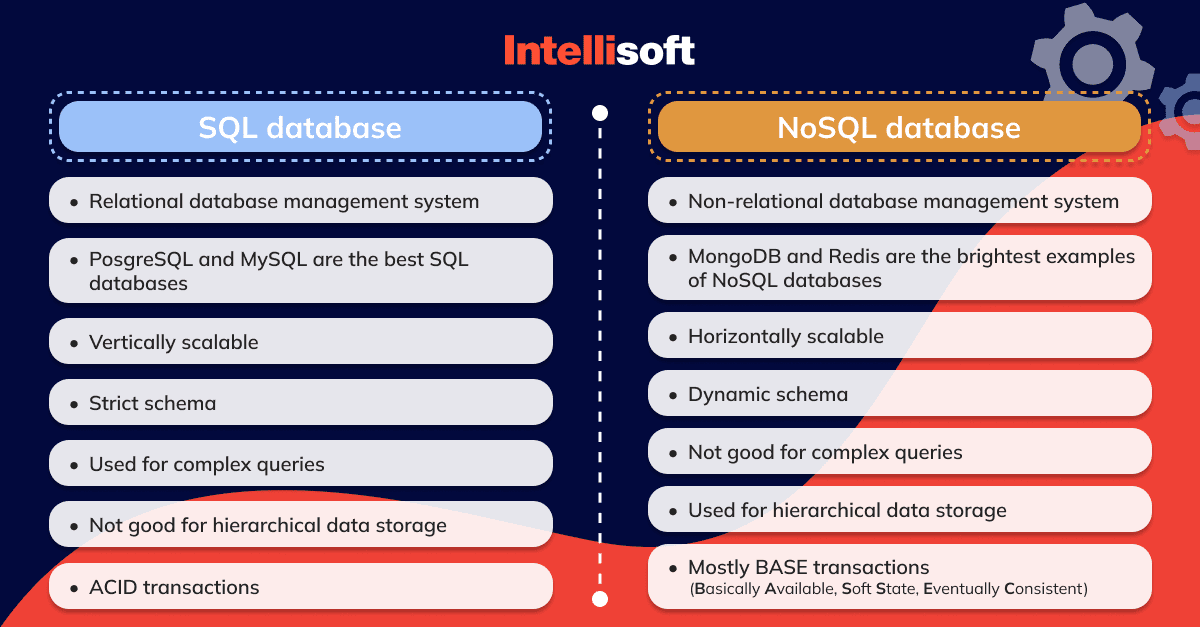
Image courtesy of intellisoft.io via Google Images
Troubleshooting Common SQL Issues
As you dive deeper into the world of SQL, you may encounter common errors and issues along the way. Don’t panic – troubleshooting is part of the learning process! We’ve compiled tips to help you identify and resolve common SQL issues quickly and effectively. And remember, there’s a wealth of resources available to support you on your journey, so don’t hesitate to seek help when needed!
Conclusion
Congratulations, teachers turned data analysts, on taking this crucial step toward mastering SQL! By transitioning from Excel to SQL, you’re opening up a world of possibilities for managing and analyzing data like never before. Remember, practice makes perfect, so don’t be afraid to experiment and keep learning. With these essential tips in your toolkit, you’re well on your way to becoming an SQL superstar. Cheers to leveling up your data game with SQL!
Generated by Texta.ai Blog Automation